keech.dev
A neobrutalist portfolio and blog built with Next.js 16, React 19, and Elder Futhark runes as a structured design language. CSS-first Tailwind v4, Velite MDX pipeline, and Upstash Redis view counting.
I built this site because every portfolio template I looked at felt like wearing someone else's clothes. They were polished, minimal, interchangeable. I wanted something that reflected what I actually care about: Norse mythology, bold design that does not apologize for itself, and a content pipeline that gets out of the way when I want to write. Claude Code built most of it. I directed the architecture, the design decisions, and the rune system. The AI handled the implementation. That workflow is exactly what I write about on the blog, so it felt right to build the site the same way.
This post walks through the decisions that shaped keech.dev: the neobrutalist visual identity, the Elder Futhark rune system, the content pipeline, and the technical architecture underneath.
The Neobrutalist Design System
Neobrutalism appealed to me because nothing is trying to look like something it is not. No subtle gradients pretending to be depth. No soft shadows suggesting physicality. Hard offset shadows, bold borders, flat colors. The aesthetic is honest in a way that felt right for a personal site.
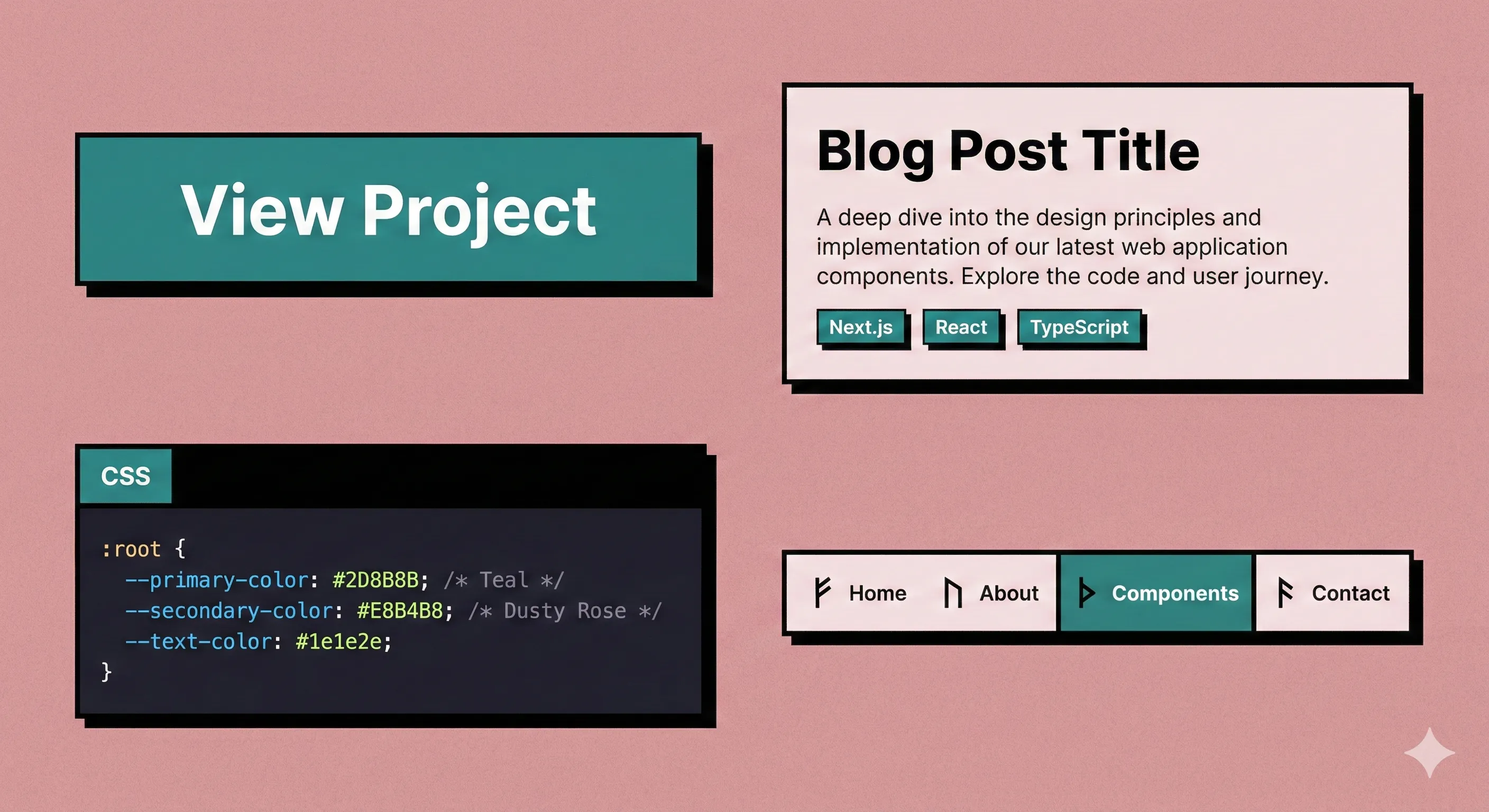
The entire visual identity is controlled by a handful of CSS custom properties in Tailwind v4's CSS-first configuration:
@theme {
  --color-background: #E8B4B8;
  --color-foreground: #000000;
  --color-accent: #2D8B8B;
  --color-accent-hover: #3AA3A3;
  --color-surface: #F5E6E8;

  --shadow-brutal: 4px 4px 0 0 #000000;
  --shadow-brutal-lg: 6px 6px 0 0 #000000;
  --border-brutal: 3px;
}
Dusty rose background, teal accents, black foreground. That is the entire palette. There is no dark mode. The color scheme is not a preference toggle. It is the brand identity. Every card, button, code block, and navigation element on the site uses these same tokens.
Tailwind v4 made this approach possible without a tailwind.config.js file. The @theme directive in globals.css defines all design tokens in pure CSS, and Tailwind generates utility classes from them. Every component is hand-built with utility classes. No component library, no design framework. Just these tokens applied consistently.
Two properties do the heaviest lifting: --shadow-brutal (the signature hard offset shadow) and --border-brutal (the 3px borders that outline everything). Change those two values and the entire site transforms.
Runes as a Design Language
The Elder Futhark runes on this site are not decoration. They are a structured design language with symbolic meaning mapped to every section.
Each navigation route has a rune chosen for its traditional association:
export const NAV_RUNES = {
  '/': ELDER_FUTHARK.othala,       // Home = heritage, one's domain
  '/blog': ELDER_FUTHARK.ansuz,    // Blog = wisdom, communication
  '/projects': ELDER_FUTHARK.kenaz, // Projects = craft, creative fire
  '/about': ELDER_FUTHARK.mannaz,  // About = self, identity
}
Othala means heritage and ancestral home. Ansuz represents wisdom and divine speech. Kenaz is the rune of craft and creative fire. Mannaz is identity and the self. These are not arbitrary assignments. The 24 runes of the Elder Futhark each carry specific symbolic weight, and I picked the ones whose meanings aligned with what each section represents.
The color system follows the three aetts (the traditional groupings of eight runes each). Freyr's aett appears in amber, Hagal's in teal, Tyr's in gold. This grouping is historically accurate to how the Elder Futhark was organized and taught.
The rune system extends into the typography. Blog post bullet lists use the Ansuz rune (communication) as their marker. Project lists use Kenaz (craft). Even the metadata separators between post dates and reading times use Jera, the harvest rune, representing the cycle of writing and being read.
The Hero Glow System
The homepage hero is where the rune system is most visible. 14 rune glows are positioned over the hero image, each with breathing animations that pulse at different rates.
The timing is deliberate. Each rune breathes at a non-round duration between 5.0 and 7.5 seconds. Round numbers like 5s or 6s would cause runes to synchronize over time, creating a pulsing "heartbeat" effect. Non-round values like 5.3s, 6.7s, and 7.1s keep them permanently out of phase.
On each page load, a Fisher-Yates shuffle randomizes the entrance order, so the glow cascade looks different every time. A ResizeObserver recalculates glow positions on viewport changes, reproducing the browser's object-fit: cover math to keep each glow anchored to the correct spot on the underlying image regardless of screen size.
The Content Pipeline
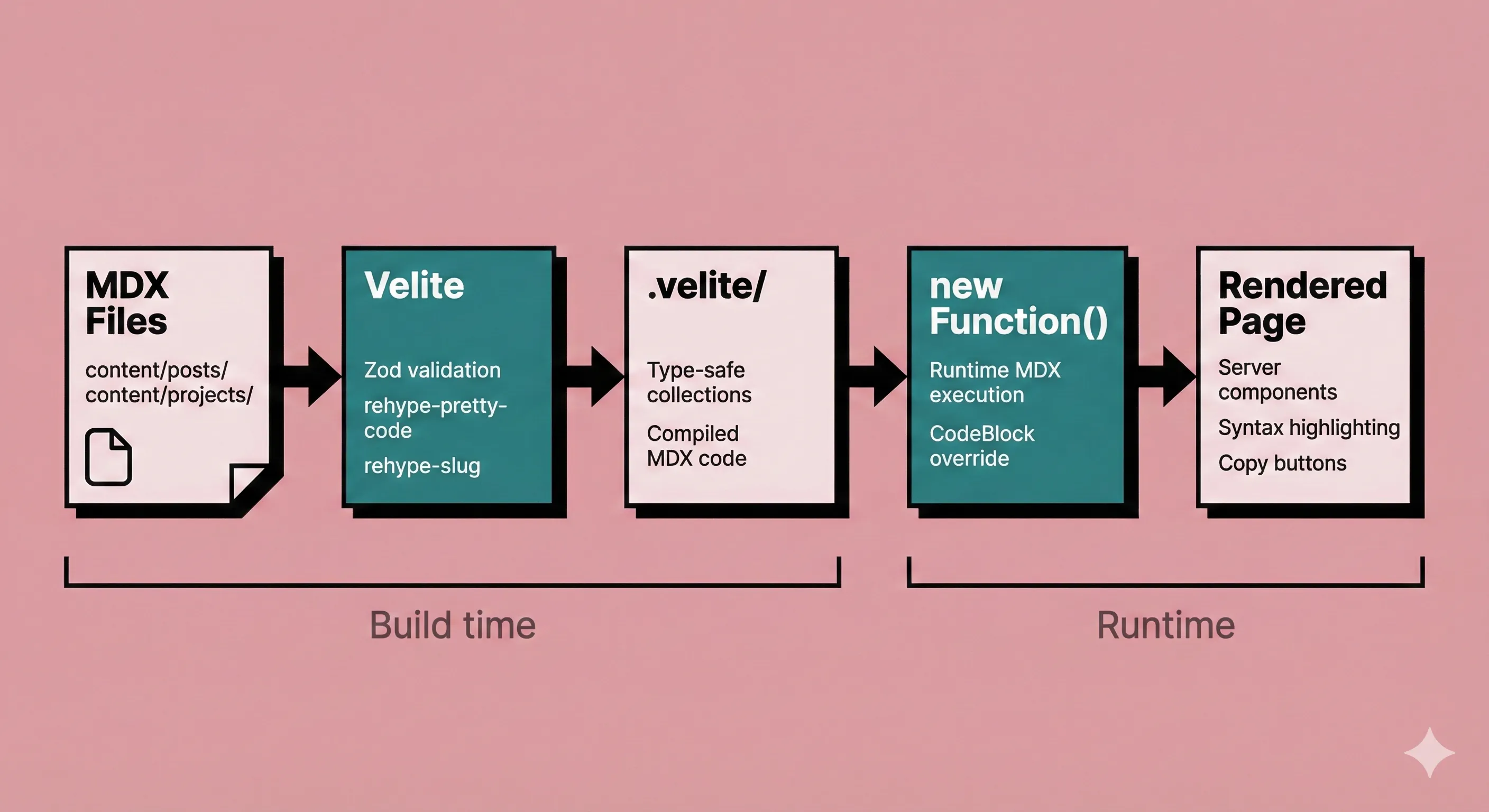
Blog posts and project pages are MDX files compiled by Velite at build time into type-safe collections. I chose Velite over alternatives like contentlayer or next-mdx-remote for a specific reason: Turbopack does not support custom webpack plugins.
Next.js 16 defaults to Turbopack for development, and most MDX solutions hook into webpack's plugin system. Velite sidesteps this entirely by running as a separate prebuild step. The build command is velite && next build, sequential by design. In development, Velite runs in watch mode alongside the Next.js dev server as two parallel processes.
The compiled MDX is executed at runtime using a pattern that surprised me:
const useMDXComponent = (code: string) => {
  const fn = new Function(code)
  return fn({ ...runtime }).default
}
new Function() executes the compiled MDX code and returns a React component. This avoids the hydration mismatches that Shiki syntax highlighting transformers can cause with server-side MDX rendering. The tradeoff is that MDX compilation must happen at build time (via Velite), but execution happens on the client. In practice, this means syntax-highlighted code blocks just work without hydration errors.
Every MDX <pre> element is overridden with a CodeBlock wrapper that adds a copy button. Syntax highlighting uses rehype-pretty-code with the github-dark-dimmed theme. Heading IDs come from rehype-slug, which makes every ## and ### linkable.
Content validation happens at build time. Both the post and project collections have Zod schemas in velite.config.ts. If frontmatter is missing a required field or a value exceeds its length limit, the build fails with a clear error. No invalid content makes it to production.
Server-First Architecture
React 19 server components are the default on this site. Client components exist only where browser APIs make them unavoidable. I went through the codebase and can name exactly why each client component needs the 'use client' directive:
- Hero: IntersectionObserver for image load detection, ResizeObserver for glow positioning, state management for the reveal sequence
- Header: Scroll lock for mobile menu, keyboard event listeners for Escape key, the
inertattribute for focus management - ScrollReveal: IntersectionObserver for single-fire entrance animations
- ViewCounter: localStorage for cached view counts, fetch for API calls
- MDXContent:
new Function()requires client-side execution - CopyButton: Clipboard API for code block copying
The inert attribute deserves a mention. When the mobile menu opens, the main content area gets inert, which disables all interaction and removes it from the accessibility tree. This is a platform-native focus trap that replaces the JavaScript focus-trapping libraries most sites use. Fewer dependencies, better browser integration, less code.
Every animation on the site respects the prefers-reduced-motion media query. The check happens on mount and listens for live changes (a user can toggle reduced motion without reloading). When reduced motion is active, all CSS animations are disabled, transitions are removed, and the rune glows are fully hidden. The site is fully functional without a single animation running.
View Counting with Redis
Blog posts track view counts through Upstash Redis with a deliberately simple architecture. Two API routes handle everything: a batch endpoint that fetches counts for multiple posts at once (used on the blog listing page), and a single-post endpoint that fetches or increments a count.
IP-based deduplication prevents inflated numbers. When a reader visits a post, the API hashes their IP with SHA-256 and attempts to set a dedup key in Redis:
const dedupResult = await redis.set(
  `dedup:${slug}:${ipHash}`, '1',
  { ex: 86400, nx: true }
)

if (dedupResult === 'OK') {
  const viewCount = await redis.incr(`views:${slug}`)
  return Response.json({ slug, views: viewCount, deduplicated: false })
}
The NX flag means "only set if not exists." If the key already exists (this IP visited within 24 hours), the set fails and the count stays the same. The IP hash is never stored in cleartext. After 24 hours, the TTL expires and the same visitor can increment again.
On the client side, localStorage acts as a read-through cache. The component checks localStorage before making any API call, which prevents the view count from flashing "0" on repeat visits while the network request resolves.
The entire view counting system is designed to fail silently. Every Redis call is wrapped in try/catch. If Upstash is down, the site functions identically. View counts are non-critical UI. No reader will ever see an error because the Redis connection dropped.